
Project information
- Company: Unit8
- Client: Switzerland's largest renewable energy producer
- Categories: LLM Applications, Document Processing, LLM Evaluation
- Main technologies: Python, Azure AI Foundry, MCP (FastMCP), Azure Container Apps, PyMuPDF, python-docx, python-pptx, openpyxl
Summary
Employees of Switzerland's largest renewable energy producer work across German, French, Italian and English, and translating a report or a deck meant waiting days for a translation agency, or pasting text into a generic tool and rebuilding the layout by hand.
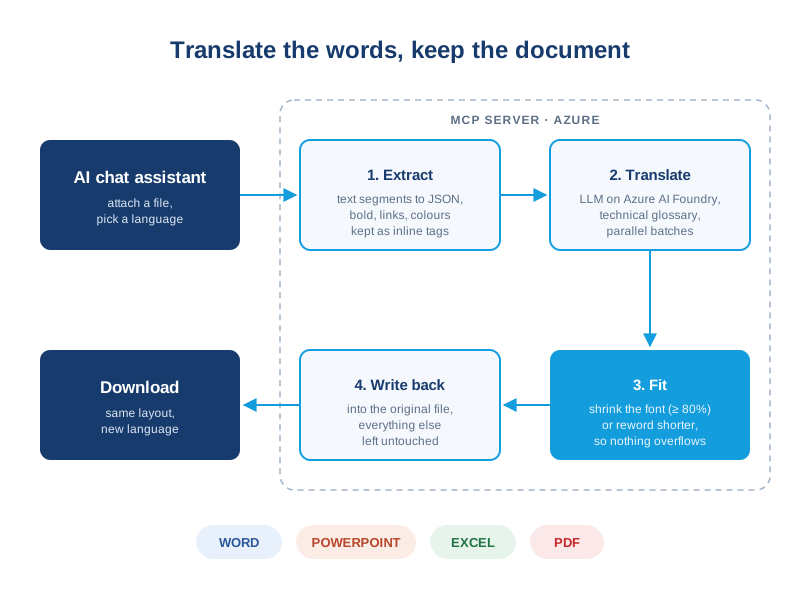
At Unit8, we built an AI document translator that lives inside the company's AI chat assistant. A user attaches a Word, PowerPoint, Excel or PDF file, names a language, and downloads the same document translated, with technical terms following a company glossary and the layout intact. I focused on the hardest part, keeping the translated document looking like the original, and on the evaluation that proves it.
Impact
- A 300-page document in about 90 seconds. A 50-page report that would take a professional translator about a week comes back in under a minute.
- Over 99% of formatting preserved on PDFs, the hardest format, up from 94%: every test document now clears the client's 95% target.
- Every change checked automatically against a test corpus in five languages, so a fix for one format can't silently break another.
The Hard Part: Text That No Longer Fits
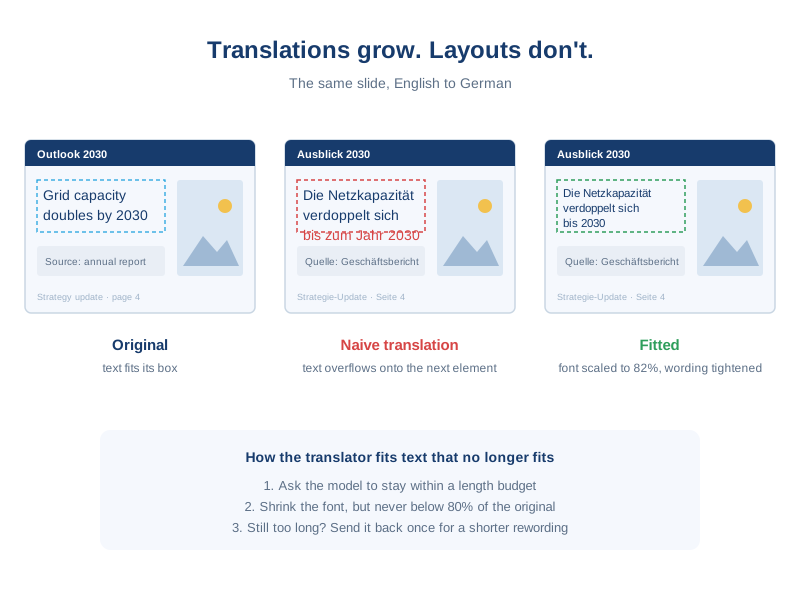
Translating the words is the easy half. A German sentence is often a third longer than its English original, and in a slide or a PDF every piece of text sits in a box of fixed size. Translate naively and text spills over images, off the page, or onto the next paragraph. The translator handles it in three steps: the model is asked to stay within a length budget, the font is shrunk but never below 80% of its original size, and text that still doesn't fit is sent back once for a shorter rewording.
Inline formatting is the other trap: a bold word or a link in the middle of a sentence may end up somewhere else once translated. Each formatted span travels through the model as a numbered tag, so the bold follows its word wherever the grammar moves it.
Measuring "Looks the Same"
"The layout is preserved" is easy to claim and hard to check, so I designed a metric to measure it: a Format Preservation Rate that lists every formatting feature of the original (a bold span, an image's position, a merged cell, a font size) and checks whether the translation still has it. It runs on a generated corpus of Word, PowerPoint, Excel and PDF documents covering every language pair, and its own tests inject known defects to prove each one is caught. That is what turned "the PDFs look a bit off" into a list of specific failures, and then into 99%.